

Who Can Do This
This area is available only to broker Admins.
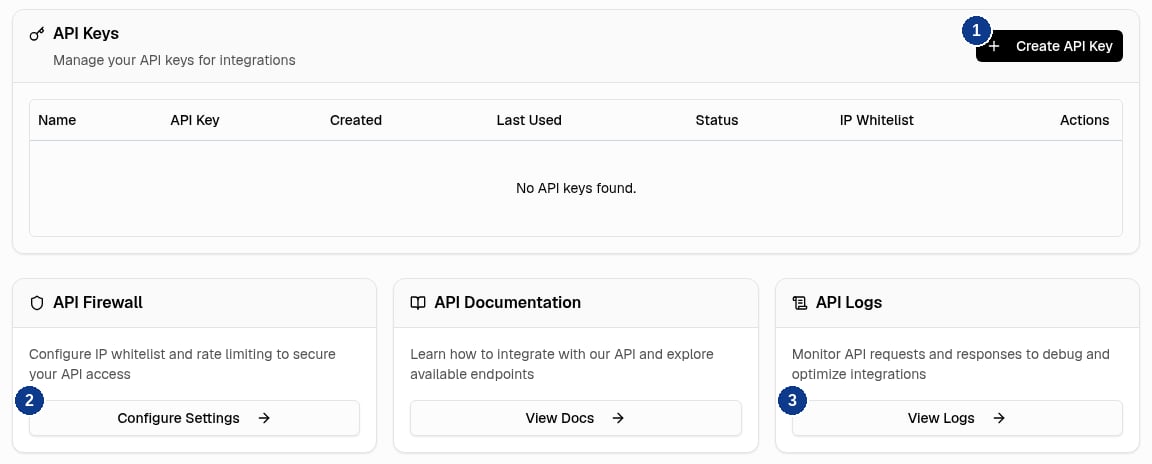
API Center Cards
Set Up an Integration
1
Open API Center
Open API Center under Integrations in the sidebar.
2
Create an API Key
Create an API key with Create API Key (callout 1). Start with a Sandbox key and grant only the required access.
3
Configure the IP Firewall
Configure the IP Firewall with Configure Settings (callout 2) if the key should accept requests only from your integration’s outbound addresses.
4
Verify API Access
Verify API access from the system that will call the API.
5
Check the Logs
Use API Logs (View Logs, callout 3) to investigate request results.
Find Endpoint Documentation
The API Documentation area opens the in-app reference. This site’s API Reference covers authentication, supported endpoints, and request and response examples.Next Step
Create an API Key
Create a Sandbox key with only the access your integration needs.