> ## Documentation Index
> Fetch the complete documentation index at: https://broker-docs.newyorkcityservers.com/llms.txt
> Use this file to discover all available pages before exploring further.
# Requests
> Review service requests, use queue filters, and approve or deny broker actions.
The **Requests** page lists service requests for your broker account. It includes requests from manual actions, public forms, and the API.
Request IDs use the `REQ-000000` format. The newest requests appear first until you select a different sort order.
## Request Approval Actions
Approval starts work for the selected request.
Service lifecycle requests have these results:
| Request type | Result of the request |
| ---------------- | ----------------------------------------------------------------------------------------------------------------------------------------------------------------------------------- |
| **New Service** | Approval creates the related service. The panel opens the service page after it accepts the request. It also performs configured welcome email, follow-up, and setup notifications. |
| **Upgrade** | Approval submits the plan upgrade for processing. |
| **Downgrade** | Approval submits the plan downgrade for processing. |
| **Cancellation** | Approval submits the cancellation for processing. |
| **Revert** | This request tracks a cancellation reversal from the service page. |
Email records have these results:
| Request type | Result of the request |
| ------------------------ | -------------------------------------------------------------------------------------------------------------------------- |
| **Welcome Email** | This request appears when a welcome email resend needs another attempt. Approval retries the resend. |
| **Cancellation Warning** | This entry records a warning email that was sent from the service page. The panel creates it with the **Approved** status. |
Denying a request does not start its service work. The panel changes the status to **Denied**. It saves the required denial reason. **Request Details** shows that reason.
## Open The Requests Queue
 1. Open the **Main Navigation** section in the sidebar.
2. Select **Requests**.
The **Service Requests** table shows 10 results on each page. Each row shows **Date**, **ID**, **Type**, **Client Email**, **Status**, and **Actions**.
Select a column heading to open its sort menu. Select **Asc** or **Desc**. You can sort by date, ID, type, client email, or status.
## Search And Filter Requests
The search field matches client email, client name, or the formatted request ID. Combine it with the **Status**, **Type**, and **Source** (**Manual**, **Form**, **API**) filters to narrow the queue. A form filter also appears when your broker account has forms; use it to show requests from one form. A filter change returns the table to the first results page.
## Understand Request Statuses
| Status | Meaning |
| --------------- | --------------------------------------------------------------------------------------------------------------------------------------------------------- |
| **Pending** | The request is waiting for a broker decision or more work. **Approve Request** and **Deny Request** are available when broker action is allowed. |
| **NYCS Review** | NYCServers is reviewing a setup or processing problem. Broker approval and denial are not available. Do not submit a second request while in this status. |
| **Approved** | The request was approved or recorded as complete. Generated service work can continue after this status appears. |
| **Denied** | A broker user denied the request. **Request Details** shows the denial reason when one is available. |
## Review Request Details
1. Open the **Main Navigation** section in the sidebar.
2. Select **Requests**.
The **Service Requests** table shows 10 results on each page. Each row shows **Date**, **ID**, **Type**, **Client Email**, **Status**, and **Actions**.
Select a column heading to open its sort menu. Select **Asc** or **Desc**. You can sort by date, ID, type, client email, or status.
## Search And Filter Requests
The search field matches client email, client name, or the formatted request ID. Combine it with the **Status**, **Type**, and **Source** (**Manual**, **Form**, **API**) filters to narrow the queue. A form filter also appears when your broker account has forms; use it to show requests from one form. A filter change returns the table to the first results page.
## Understand Request Statuses
| Status | Meaning |
| --------------- | --------------------------------------------------------------------------------------------------------------------------------------------------------- |
| **Pending** | The request is waiting for a broker decision or more work. **Approve Request** and **Deny Request** are available when broker action is allowed. |
| **NYCS Review** | NYCServers is reviewing a setup or processing problem. Broker approval and denial are not available. Do not submit a second request while in this status. |
| **Approved** | The request was approved or recorded as complete. Generated service work can continue after this status appears. |
| **Denied** | A broker user denied the request. **Request Details** shows the denial reason when one is available. |
## Review Request Details
 1. Find the request in **Service Requests**.
2. Select **View**.
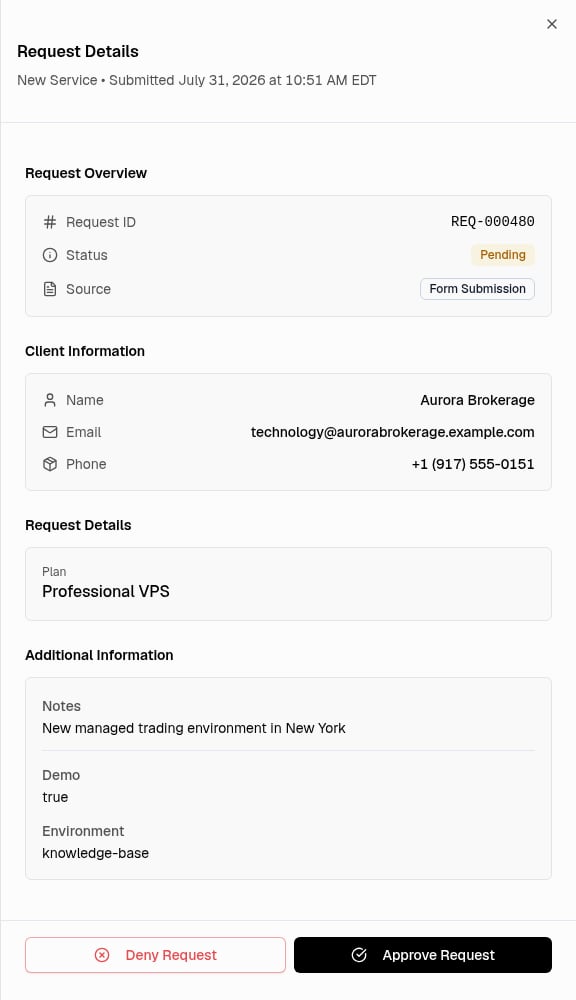
The **Request Details** sheet shows the request type and submission date. **Request Overview** shows the request ID, status, and source.
The sheet can also show source details:
* **View Form** for a form submission.
* **API Key** for an API request with saved key details.
* **Requested By** when the panel has an actor label.
The sheet can also show processing details:
* **Approved Date** or **Denied Date** for a processed request.
* **Processed By** when that value is available.
* **Denial Reason** for a denied request.
**Client Information** shows the client name and email. It can also show a phone number and a link to the related service.
**Request Details** shows the current plan and requested plan when they apply. **Additional Information** shows notes and public custom form answers when they are available.
## Approve A Request
The panel processes the selected request after confirmation. The approval dialog states that the client will be notified.
1. Open **Request Details** for the correct request.
2. Review the client and request information.
3. Select **Approve Request**.
4. Check the request ID in **Approve Request**.
5. Select **Approve Request** to confirm.
The confirmation control shows **Processing...** while the panel handles the action. A successful New Service request opens the related service page. Other successful requests close the sheet and refresh the queue.
## Deny A Request
A denial reason is required. The panel records the reason with the request. It does not email the denial reason to the client.
1. Open **Request Details** for the correct request.
2. Select **Deny Request**.
3. Enter the reason in **Denial Reason**.
4. Review the reason.
5. Select **Deny Request** to confirm.
The panel closes the sheet after a successful denial. The request then shows **Denied**.
## Status And Error Behavior
An approval can submit asynchronous setup or service work. The request status can update before all generated work completes. Check the related service for its current service status. If setup has a retryable problem, the panel shows **Request sent for NYCS review** and moves the request to **NYCS Review**.
A general approval error keeps the confirmation dialog open; try again shortly. A failed welcome email retry keeps the request pending for review. A denial error shows **Failed to deny request** with the returned error and keeps the request available; review the message before you retry.
## Permissions
Signed-in broker **Admin** and **Staff** users can view requests for their broker account. Both roles can approve or deny an eligible pending request.
The panel removes approval and denial actions after a request is processed. It also removes these actions during **NYCS Review**.
1. Find the request in **Service Requests**.
2. Select **View**.
The **Request Details** sheet shows the request type and submission date. **Request Overview** shows the request ID, status, and source.
The sheet can also show source details:
* **View Form** for a form submission.
* **API Key** for an API request with saved key details.
* **Requested By** when the panel has an actor label.
The sheet can also show processing details:
* **Approved Date** or **Denied Date** for a processed request.
* **Processed By** when that value is available.
* **Denial Reason** for a denied request.
**Client Information** shows the client name and email. It can also show a phone number and a link to the related service.
**Request Details** shows the current plan and requested plan when they apply. **Additional Information** shows notes and public custom form answers when they are available.
## Approve A Request
The panel processes the selected request after confirmation. The approval dialog states that the client will be notified.
1. Open **Request Details** for the correct request.
2. Review the client and request information.
3. Select **Approve Request**.
4. Check the request ID in **Approve Request**.
5. Select **Approve Request** to confirm.
The confirmation control shows **Processing...** while the panel handles the action. A successful New Service request opens the related service page. Other successful requests close the sheet and refresh the queue.
## Deny A Request
A denial reason is required. The panel records the reason with the request. It does not email the denial reason to the client.
1. Open **Request Details** for the correct request.
2. Select **Deny Request**.
3. Enter the reason in **Denial Reason**.
4. Review the reason.
5. Select **Deny Request** to confirm.
The panel closes the sheet after a successful denial. The request then shows **Denied**.
## Status And Error Behavior
An approval can submit asynchronous setup or service work. The request status can update before all generated work completes. Check the related service for its current service status. If setup has a retryable problem, the panel shows **Request sent for NYCS review** and moves the request to **NYCS Review**.
A general approval error keeps the confirmation dialog open; try again shortly. A failed welcome email retry keeps the request pending for review. A denial error shows **Failed to deny request** with the returned error and keeps the request available; review the message before you retry.
## Permissions
Signed-in broker **Admin** and **Staff** users can view requests for their broker account. Both roles can approve or deny an eligible pending request.
The panel removes approval and denial actions after a request is processed. It also removes these actions during **NYCS Review**.